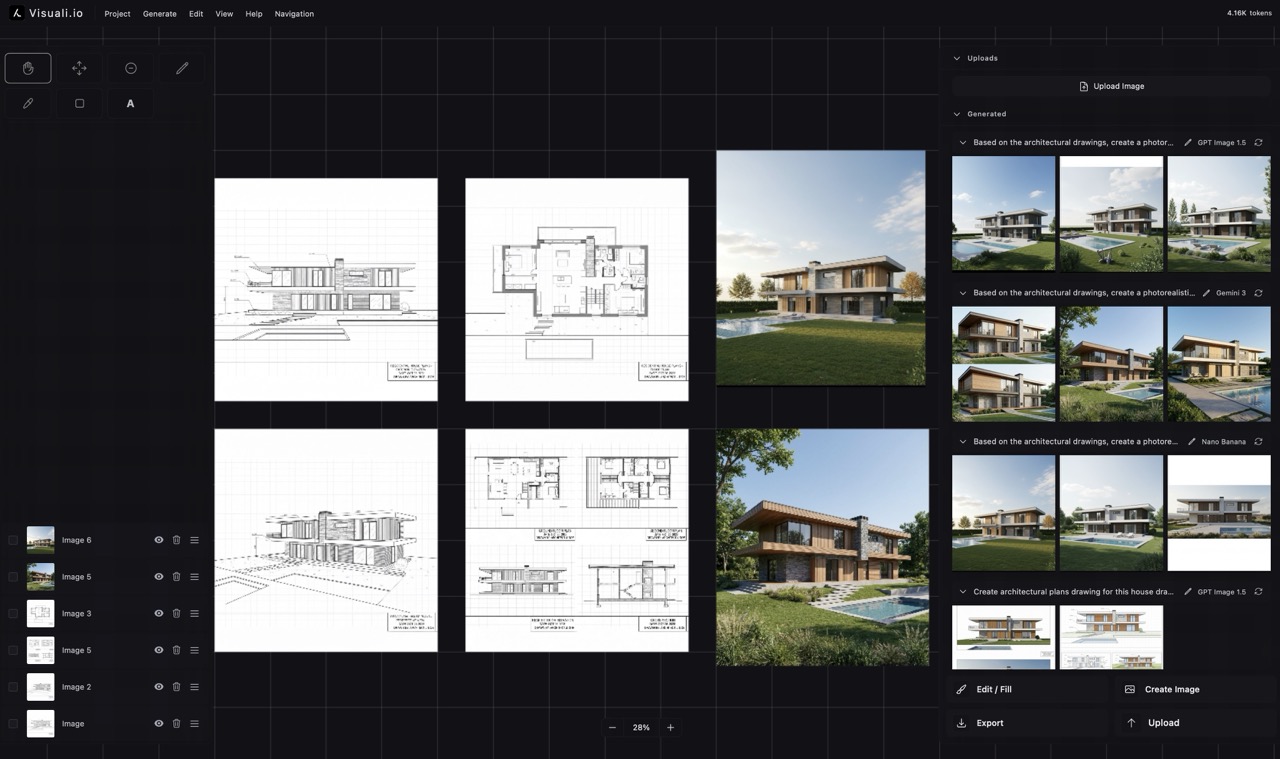
Architectural concepts generated with Visuali

AI Architecture Rendering

Architectural visualization traditionally requires expensive software and long render times. With Visuali, you upload reference photos, arrange them as a visual brief, and generate presentation-ready concepts in seconds.

The image above shows four reference photos arranged on the canvas, each captured with an input frame. The AI uses all four as visual context to generate architectural renders, visible on the canvas and in the right sidebar. Multiple variations were generated from the same set of references.

How it works

01

Upload your references

Bring in site photos, sketches, material samples, and inspiration images. Upload multiple files at once and drag them onto the canvas.

02

Arrange a visual mood board

Position your references on the infinite canvas however you like. Group materials together, place site photos next to sketches, and build a visual brief.

03

Add input frames and prompt

Switch to edit mode and add input frames over each reference image. Write a prompt describing the architectural render you want. The AI sees all framed references as context.

04

Generate and iterate

Generate concept renders, compare variations side by side on the canvas. Adjust your prompt, swap materials, or change the composition and generate again.

Multiple image inputs

Use up to 6 reference images simultaneously. Site photos, material swatches, and sketches all feed into a single generation.

Concept generation

Describe the building you want in natural language. The AI generates architectural concepts from your text and visual references.

Material and facade exploration

Swap references to explore different cladding, finishes, and landscaping. Each generation reflects the updated visual context.

Infinite canvas

No fixed canvas size. Arrange mood boards, references, and renders across an unlimited workspace.

Outpainting for presentations

Extend renders beyond their borders to create wider views, aerial perspectives, or presentation board layouts.

Layer management

Every generated render sits on its own layer. Compare options, toggle visibility, and organize your design explorations.

Why it matters

Early-stage architectural design is about exploring possibilities quickly. Visuali lets you go from a handful of reference photos to multiple concept renders in minutes, without learning 3D modeling software. You can iterate on materials, facades, and compositions as fast as you can describe them, making it easier to align with clients and move projects forward.

Use cases

  • Facade material and finish exploration
  • Concept visualization from initial sketches
  • Site context renders using real photos as input
  • Presentation board creation with extended compositions
  • Design iteration with rapid client feedback cycles
  • Comparing multiple design directions side by side

Frequently asked questions

Can I use multiple reference photos at once?

Yes. You can use up to 6 reference images simultaneously, including site photos, sketches, and material samples. The AI considers all of them when generating renders.

Do I need 3D software to create architectural renders?

No. Visuali generates renders from text prompts and image references directly in the browser. No plugins, installations, or 3D modeling skills required.